My wife had a small, cheap digital scale she liked. Got it off Amazon or
some such, I think. Worked fine for her, for a few months or so. Then one
day she brings to me and says it’s having problems.
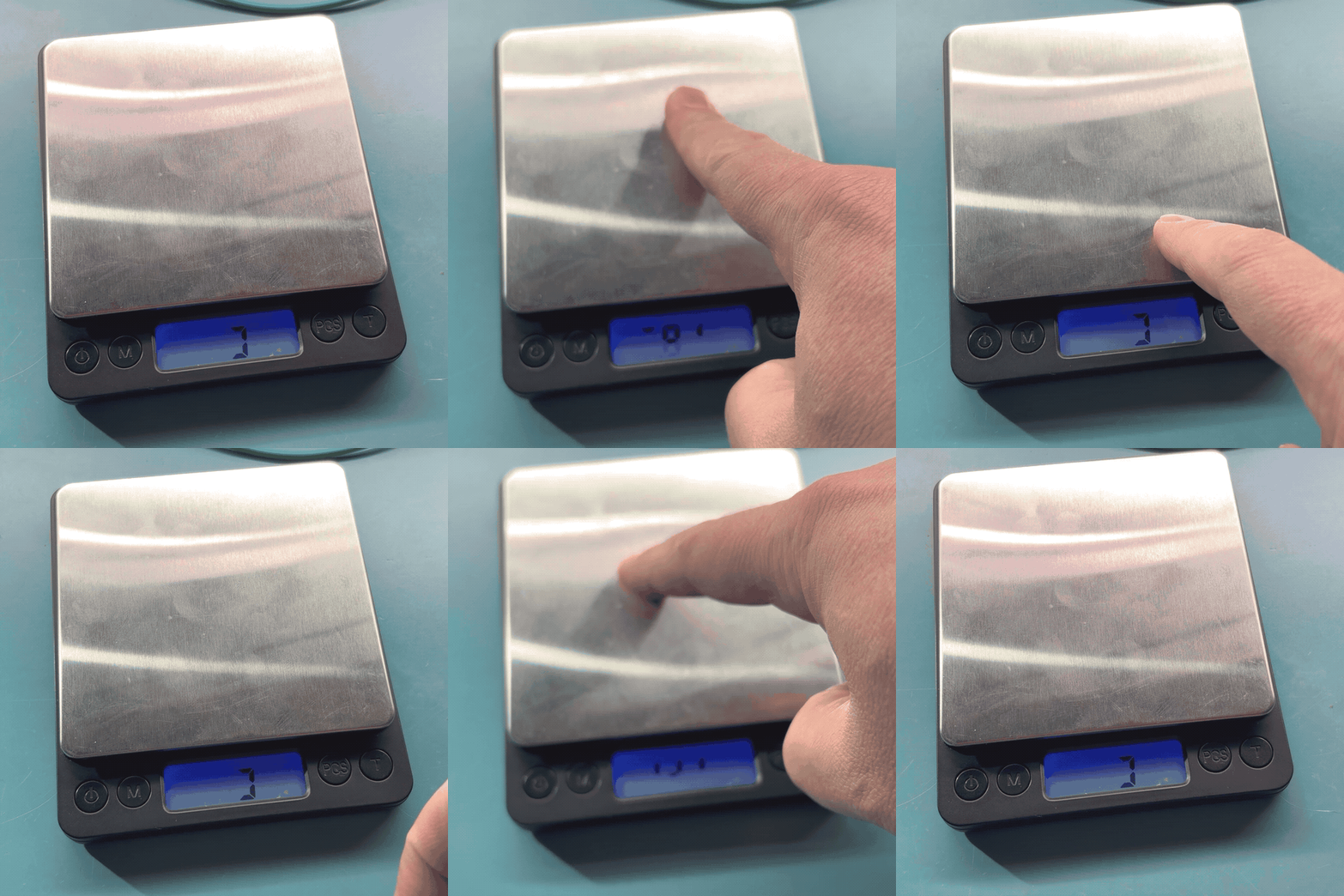
I turn it on, and press on it. Portions of the digits appear. I let off,
and the portions of digits disappear. Repeat. Alright, it’s responding to
weight on the scale. I figure the connection to the scale, and whatever
custom IC is running the thing are fine. Something has happened to the
display. Let’s take it apart and see what’s up.
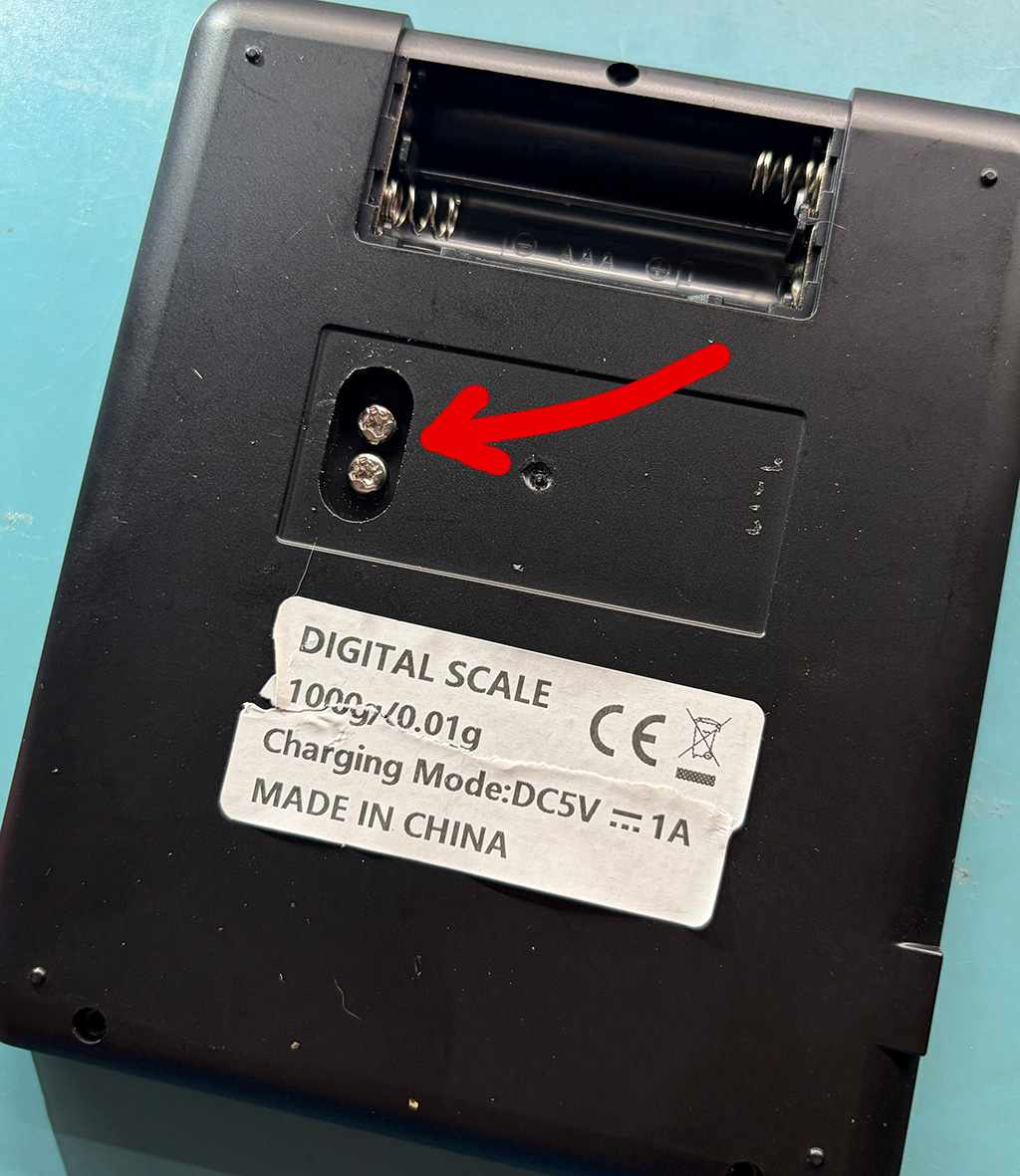
These screws are hidden under the label. They’re also the ones that
hold the whole plate assembly to the case.
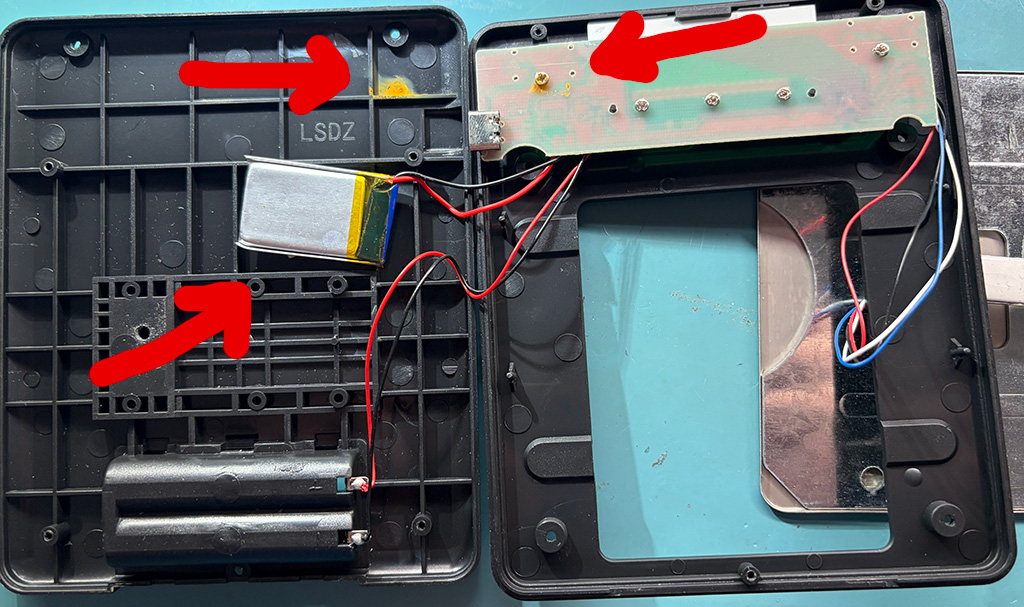
Looking at the top two arrows, there’s some sort of corrosion that
must’ve come through the screw hole, and pooled down in the bottom of
the case. That’s not encouraging.
We’ve also got a little LiPo pack, with no temperature sensing, and a
distressing charging rate. When I first plugged it into a 5V supply through
a power measurement widget, it reported 600mA of draw. That dropped to
550mA and then 500mA rather quickly, but unfortunately it sat there at
half an amp for longer than I was comfortable with. I disconnected the power,
and when I reassembled the whole thing I omitted the pack.
I would’ve expected a charging rate in the ballpark of 25mA to 150mA. 500mA
is way too much, especially without any thermal sensor. I’m attributing
all of that current to the charge rate, because a digital scale like this
isn’t going to draw more than some tens of milliamps. If the charge circuit
is linear, then the remainder of the input is the output to the battery.
If the charge circuit is switching, then it’s even worse.
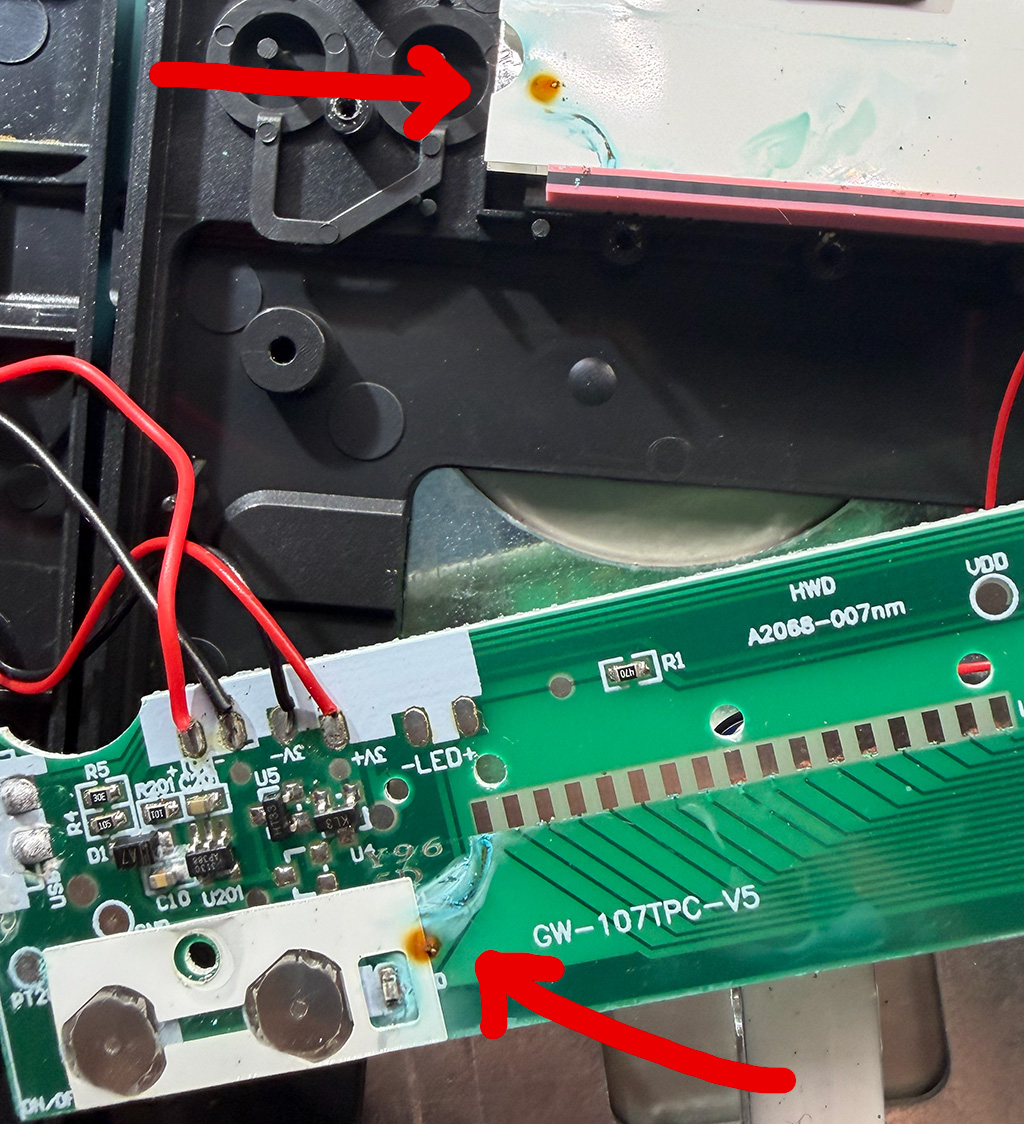
Here the PCB has been flipped over, towards the bottom of the image.
At the top, the large white area is the back side of the LCD. The red
and black foam strip on it is an “elastomeric connector”. When squished
between the LCD and PCB, it connects the signals on one to the other.
It actively requires a bit of compression to work.
We’ve also got some corrosion on the top here, that looks like it dribbled
or migrated around on the PCB. I looked at all of the solder joints on the
left side of the image, they were… fine. Electrically conductive. Most
of them looked like they had a crust of flux on them. I scraped a lot of
that off. Later when it was disconnected, I rinsed it off and scrubbed it
with a brush. A pat with a paper towel, and by the time the soldering was
done it seemed dry enough. Your mileage may vary.
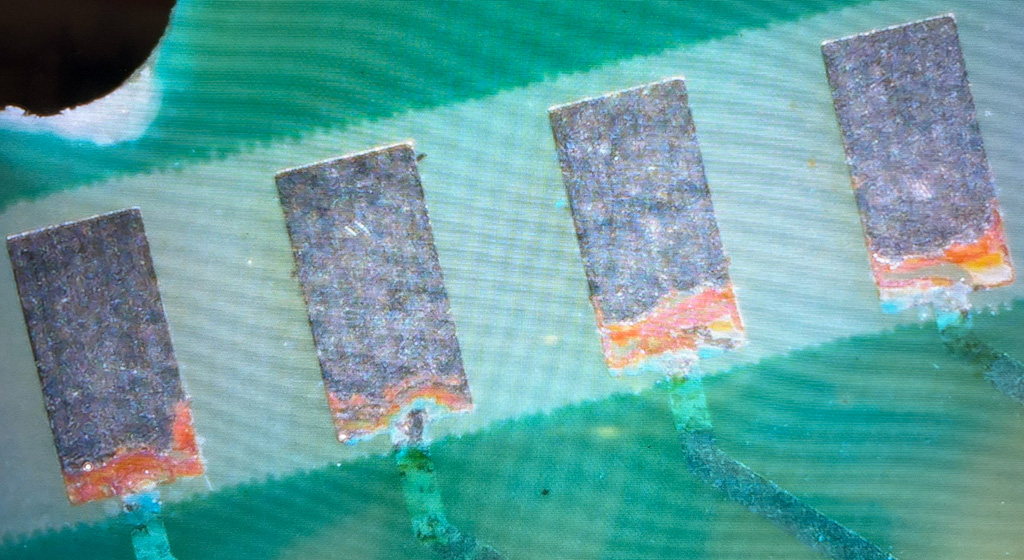
We can see, even at this scale, that some of the pads connecting the
epoxy-blobbed IC (off to the right, not visible) to the LCD are looking
a little rough. Let’s zoom in…
Yeah… those aren’t connected any more. There are 17 of them, I went down
the line, scratching at the corroded whatever with my tweezers. It all came
right off. Usually a bunch of the HASL next to it came off too, revealing
corrosion underneath. I kept going until it stopped flaking off instantly.
As I recall about two of the pads were okay, and the rest were reduced to
40% to 70% of their original area. All of the damage was on the same side,
where the trace entered the pad.
I fluxed them all, put new solder on, removed it all with wick, fluxed it
all and put solder on again and then flattened it with wick. I figured
that’d help me clean up the area. Weirdly some patches of the “good” looking
pre-existing HASL wouldn’t take solder. No idea what was going on there.
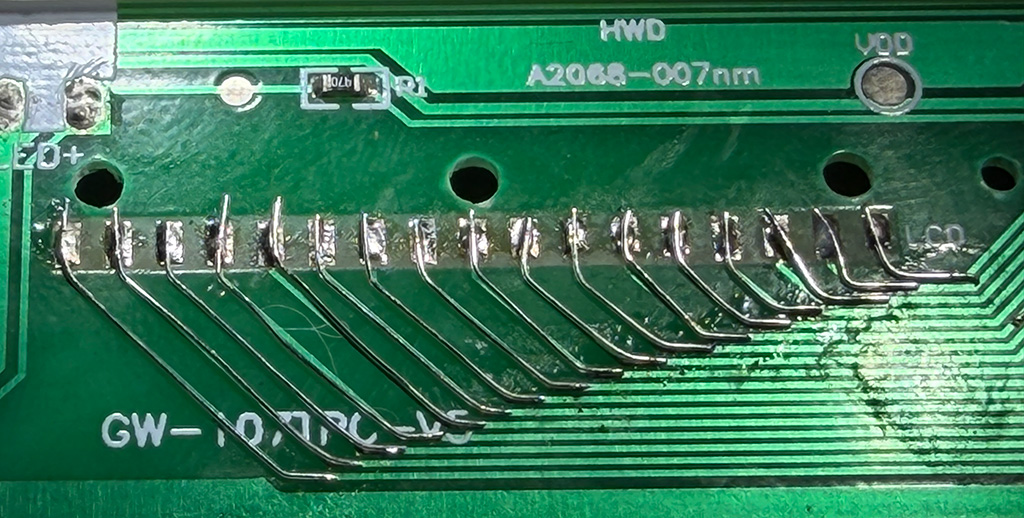
With all of the pads wetted, I went down past the 45 degree bend in
all the traces that you see in the picture, and scuffed off the solder
mask. It came off with surprising ease. Probably could’ve gotten it
up with a harsh glare. I fluxed and tinned the exposed bit of
trace. Finally I came back with 30 AWG kynar wire, stripped all the
insulation off, tacked one end onto the trace, bent it to follow the
existing PCB trace, and then soldered the other end to the pad. As
you’ll see in the picture, I stripped the wire completely bare. It’d
be nice to leave the insulation on in the middle, but then I would’ve
needed to precisely measure the length of the wire before cutting and
soldering. I wouldn’t have trusted the solder joints at either end to
hold up to having insulation stripped from the other end.
Conveniently, the elastomeric connector didn’t mind the pads becoming 0.25mm
taller. It naturally expects some compression, and apparently had at least
that much room left in the “squishiness budget”. I wouldn’t want to use
thicker wire, and briefly considered ordering some 34 AWG wire for the task.
And there’s all the traces taken care of. Wasn’t too bad, just repetitive.
In the end, the display worked again. The power button was a little hinky,
I either got water inside of it, or perhaps disturbed the alignment. I think
it’s the kind where it’s a bent bit of sheet metal held in place with
adhesive. Regardless, it was usable again.
Conclusion!
I was told that no liquids had been spilled on it since my wife got it.
As a chemist, she pays attention to that sort of thing, so I’m taking that
as a given.
My best guess is that it was assembled using corrosive flux, and it
wasn’t cleaned off. It sat there for awhile, until it was exposed to
increased humidity, at which point it started to migrate into and along
the elastomeric connector. Which I guess wasn’t affected? Or maybe in a
few more months the scale will come back to me and I’ll find the connector
has dissolved.
My wife “returned” a PC I built for her office years ago, as she no longer
needed it. It’d been in storage for some years, so I figured I’d check on
it before breaking it down to parts and storing them, as I do.
Disappointingly, it failed to boot. The short version is that the BIOS
was lightly corrupted, so I desoldered it, reflashed it, put it back on,
and the board was fine. I’ll describe here the issues it presented with,
and the minor hurdles encountered, so you can recognize the problem
and have a smoother time of dealing with it than I did.
Symptoms
With the board on the bench, all of the extraneous widgets removed,
and a selection of independently tested CPUs and RAM, we had the
following behaviors on boot (with all combinations of CPU and RAM):
Without RAM, it beeps.
With RAM, it reboots a few times like it’s doing memory training.
Never progresses further than that.
Never produces the “no video adapter” beeps, even when there isn’t a video adapter.
Definitely never displays anything.
No amount of resetting the CMOS settings (with the little jumper) had any effect.
This suggested that the CPU and chipset were doing something. The board
wasn’t totally dead. It helped that it was clean and I knew it had been
in climate controlled storage. No leakage from the coin cell battery.
I figured that the possible issues were something like:
Damage to the DIMM socket or traces.
BIOS was corrupted.
Sockets and traces all looked fine, nobody had been in the case since me
some years prior. Couldn’t do much about either of those anyways. BIOS
corruption could be dealt with.
Hardware Process
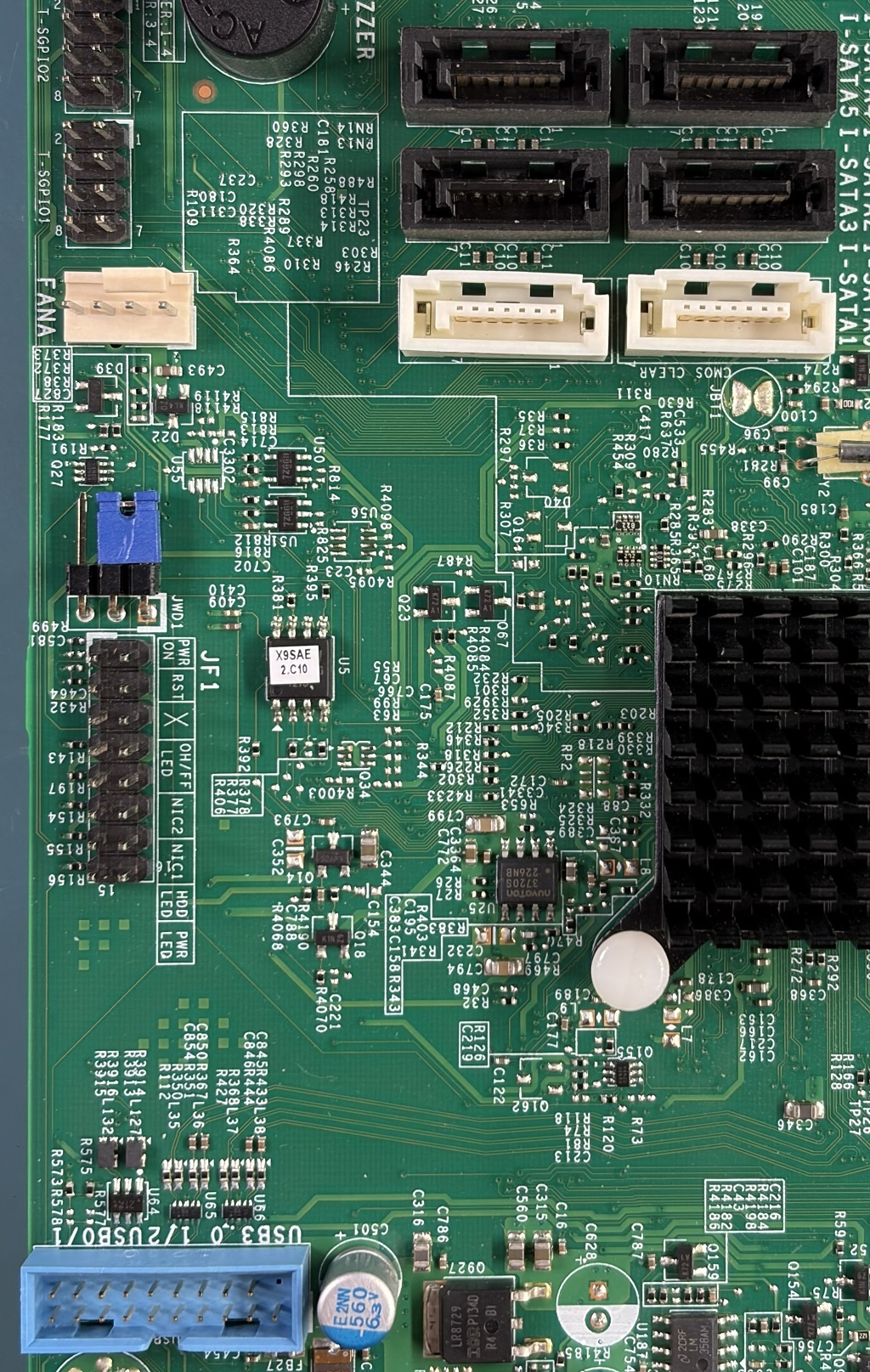
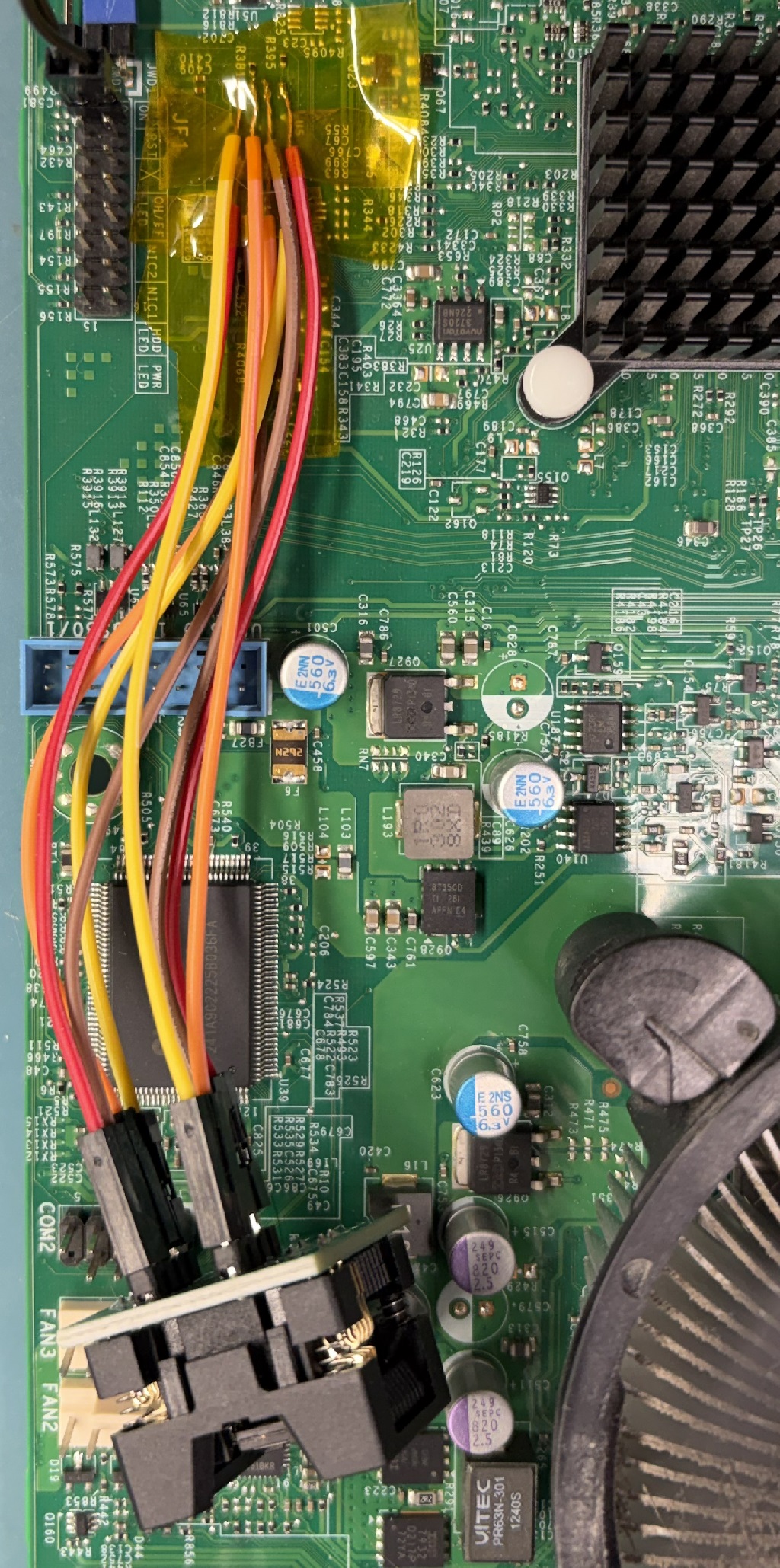
The BIOS is stored in a W25Q128 family 8-SOIC 208mil wide part (U5,
near the center of the image, to the right of the silkscreen for
JF1). Surface mounted, no socket alas. (The ASUS I was testing
components in had a nice socketed 8-DIP BIOS. Every time I looked at
it, I sighed.) I tried using an 8-SOIC clip-on adapter to reflash it
in-circuit, but had no luck. I assume other things were loading the
signals. I moved on to the desoldering plan.
The motherboard is certainly multilayer, and was assembled in the
RoHS era with what has to be lead-free solder. Having learned my
lesson from some other boards, I built a little kapton and aluminum
foil shield around neighboring parts, and hit the BIOS with hot air.
So much hot air, for so long. And it had no effect at all.
Since replacement parts are easily acquired on DigiKey and Mouser, I
figured I could be a little rougher. I took the soldering iron,
liquified the solder on each pin and lifted it with tweezers. Did one
side, and then as I recall I was able to sort of lay my iron across
all four pins on the other side and get them all at once. This is a
slightly fiddly procedure. You only need light pressure on the pins
while lifting them; the goal is to get them out of the solder puddle,
not to bend them 45 degrees. Same thing with lifting the chip while
heating four pins at once. You’re pulling on something that weighs a
fraction of a gram; any force at all will lift it from the board the
instant the solder is all liquid. If you haven’t done this before,
watch a bunch of YouTube soldering videos. An 8-SOIC is about as easy
an introduction to surface mount soldering as you can ask for, but you
don’t want to lift pads off the PCB and turn it into a challenging
repair.
Chip off the board, I straightened up the pins, put some low temp
leaded solder on the pads, and cleaned it back off with wick, to leave
them clean and flat. A little heat on the pins and I sort of smeared
the remaining solder around on them so the chip would fit into a
socket. It read out just fine; most of the remaining real difficulty
was in prepping the new BIOS. I’ll cover that in the next section and
finish describing what I did with the hardware.
With the new image complete, and flashed onto the chip, I was concerned
that I might’ve done it wrong, and thus need to iterate on the
flashing/testing process, so I was afraid to just solder the chip back
down. Instead I soldered 8 female dupont jumper wires onto the 8-SOIC
pads and hooked them up to the socket. I plunked the chip in, and booted
the system without problem. While you can skip this step, because you’ve
got the next section and this whole thing to reassure you that it’ll be
fine, at least you now know that the board will boot with the BIOS hanging
off the board by 3-4 inches of loose wire.
After I confirmed it booted, I removed the wires and soldered the chip
straight down with the lowest temperature leaded solder I had on hand.
Hopefully that will make it easier for hot air to remove in the future,
if necessary. And of course, it still worked after that.
(I used a T48 and minipro for
reading and writing to the flash. There are dozens or hundreds of ways
of accomplishing this. A Raspberry Pi, or a Pico, and some wires, can do
it. A 3.3V parallel port and some wires could probably do it, too, if you
were patient enough.)
Software Process
The chip is 128 Mbit, or 16 MiB. You can get the latest BIOS for the
board from Supermicro (2.3a, X9SAE1_106.zip), and find inside of it
a 16MiB X9SAE1.106. ifdtool -d on your dumped BIOS and the one
from Supermicro should be similar. My image’s descriptor table had
read/write access enabled for all areas, whereas the Supermicro image
has most access disabled. That controls the running system’s access
to the various regions of flash. The old permissions had been fine,
so I figured I’d retain them.
Using ifdtool -x I extracted the regions from my BIOS and the Supermicro
BIOS into four files each.
[jkominek@kyatt x9sae]$ /usr/sbin/ifdtool -x dumped-x9saev.rom
Warning: No platform specified. Output may be incomplete
File dumped-x9saev.rom is 16777216 bytes
  Flash Region 0 (Flash Descriptor): 00000000 - 00000fff
  Flash Region 1 (BIOS): 00c00000 - 00ffffff
  Flash Region 2 (Intel ME): 00003000 - 00bfffff
  Flash Region 3 (GbE): 00001000 - 00002fff
  Flash Region 4 (Platform Data): 00fff000 - 00000fff (unused)
[jkominek@kyatt x9sae]$ ls -l flashregion*
total 5953
-rwx------+ 1 jkominek     4096 Oct 19 11:33 flashregion_0_flashdescriptor.bin
-rwx------+ 1 jkominek  4194304 Oct 19 11:33 flashregion_1_bios.bin
-rwx------+ 1 jkominek 12570624 Oct 19 11:33 flashregion_2_intel_me.bin
-rwx------+ 1 jkominek     8192 Oct 19 11:33 flashregion_3_gbe.bin
I wanted to keep my original flash descriptor, and my GbE data, since that
had my MAC addresses. None of the checksums matched with the vendor BIOS,
which isn’t surprising. I assumed I needed to keep the BIOS and Intel ME
matching, and they’re the “meat” of the image, so I chose to inject my
old descriptor and GbE data into the new vendor image, which worked fine
for me:
repaired.rom will be 16MiB and requires no further preparation before
writing to the chip.
What was corrupted?
This is bonus points: what had gone wrong? It’s possible that my
particular failure mechanism is because of where the BIOS was
corrupted. If the bit had been in some text used in the BIOS
configuration menu, I’d have never noticed.
The descriptor and GbE sections didn’t matter, I was replacing those.
ME Analyzer didn’t report any
CRC errors on the Intel ME section.
uefiextract produced some errors, though:
[jkominek@kyatt x9sae]$ uefiextract dumped/flashregion_1_bios.bin
parseFileHeader: invalid data checksum D8h, should be 98h
parseFileHeader: file alignment 10h is greater than parent volume alignment 8h
parseCompressedSectionBody: decompression failed with error Customized decompression failed
parseFileHeader: file alignment 10h is greater than parent volume alignment 8h
parseFileHeader: invalid data checksum 83h, should be 82h
parseFileHeader: file alignment 1000h is greater than parent volume alignment 8h
parseFileHeader: invalid data checksum 5Ah, should be AAh
parseFileHeader: file alignment 1000h is greater than parent volume alignment 8h
Maybe uefiextract and Supermicro just don’t get along? Let’s check it against
the BIOS in the fresh vendor file:
[jkominek@kyatt x9sae]$ uefiextract vendor/flashregion_1_bios.bin
parseFileHeader: file alignment 10h is greater than parent volume alignment 8h
parseFileHeader: file alignment 10h is greater than parent volume alignment 8h
parseFileHeader: file alignment 10h is greater than parent volume alignment 8h
parseFileHeader: file alignment 1000h is greater than parent volume alignment 8h
parseFileHeader: invalid data checksum 5Ah, should be AAh
parseFileHeader: file alignment 1000h is greater than parent volume alignment 8h
Not encouraging. But my file has at least two more checksum errors, and
that decompression failure, over the vendor BIOS. So I figured the vendor
version was better than what I had.
I pulled up UEFITool NE on the BIOS section and took a look around.
At this point my enthusiasm for investigating was waning, as I had a
solid plan for repair. But I found a FV_MAIN_NESTED (which
contained a compression section) had a bad checksum. So that’s one checksum
error and the decompression error. Next, CpuPei had a bad checksum.
Finally, BiosAc also had a bad checksum, but that turned out to be
bad in the vendor BIOS, too.
So I blamed everything on the CpuPei corruption and considered my
investigation complete. Could it have been something else? Perhaps.
My understanding of UEFI is minuscule, so there might have been some
other ramification or result of the damaged compressed section.
Epilogue
I took the battery out and stuck the motherboard into an ESD bag and
put it into storage.
Why didn’t I take the opportunity to install a socket for the BIOS?
If it had been a DIP package soldered to the board, I would
have. Those sockets are cheap, and I keep a stock of them. There are
surface mount sockets for surface mount parts, and I think at the time
I even found one for the 208mil 8-SOIC, but it was $5 or so, and I don’t
anticipate having to remove the chip again.
Since the release of the Racket
Manifesto by
Felleisen, et al. it has become a thesis of mine that normal
programmers face, on a regular basis, real problems which could be
alleviated by the sorts of macro mechanisms offered by Racket (and to
a lesser extent, other Lisps). I’ve got in mind some in-depth
investigations I’d like to perform to really back this argument up,
but until I have time for that, a recent article will serve as a
sort of teaser for what I’ve got in mind.
When writing program code, programmers often have to write a series
of similar constructs. Typing the same code several times is boring
and inefficient. That’s why they use the Copy-Paste method: a code
fragment is copied and pasted several times with further
editing. Everyone knows what is bad about this method: you risk
easily forgetting to change something in the pasted lines and thus
giving birth to errors. Unfortunately, there is often no better
alternative to be found.
Now let’s speak of the pattern I discovered. I figured out that
mistakes are most often made in the last pasted block of code.
Andrey goes on to provide some evidence for his assertion. I think
he’s on to something, and it makes sense. You do your pasting, then
you set your hands in motion with some repeated delete delete delete
type type type down arrow, repeat. By the time you’ve done that three
or four times, your mind is numb, your eyes are glazed, and the
muscles aren’t being supervised anymore.
I’d like to point out and discuss two of his examples:
They’ve got some bitmasks that are referenced via variables (they’re
probably #defines, but it doesn’t matter), and when the relevant
bits are set, they’d like to write out the name of the bitmask that
was set. Turns out this could actually be implemented as a function:
Hmm. Not really an improvement. We’re still duplicating things. And
the repetition of access and output is tedious. I’d expect most
programmers to copy and paste the function call. Back where we started.
The C macro system happens to be powerful enough to address this case:
#define C_A(a,o,s) \
if (a & s) \
o.append(ASCIIToUTF16("\t" #s "\n"));
C_A(access,output,FILE_WRITE_ATTRIBUTES)
will expand to what we want.
This accomplishes our goal, because the macro is able to see the symbol
FILE_WRITE_ATTRIBUTES, rather than just the value of 0x00100 or whatever
it might happen to be.
We could shorten the uses of C_A by having the macro definition
refer directly to access and output. But sooner or later, that
will trip over standard macro
hygiene problems.
And, unsurprisingly, that doesn’t work. Perhaps a more clever C
preprocessor could notice that the for loop is static, and generate
all of the appropriate code. Maybe there’s even some option I don’t
remember floating around that would work with existing preprocessors.
Frankly, I’m pleased I remember how to do the stringification and
concatenation.
That’s not short. But if you’re going to be writing a lot of code
where you want to pull values out of variables with numbers in their
names, and stuff those values into corresponding positions in arrays,
wouldn’t it be nice to have? How many times would you need to use it
before it became worth the effort, in order to avoid the copying and
pasting?
How much effort would it be worth to eliminate a class of errors?
Finally
Refer back to the bold portion of Andrey’s text: “there is often
no better alternative to be found”. What? We’re programming! We’re
providing instructions to a machine, which will be faithfully executed
on our behalf, regardless of how tedious and repetitive they may be,
and there’s no better alternative than copying and pasting?
When the Racket manifesto discusses Racket’s design principles, the
authors write:
When programmers must resort to extra-linguistic mechanisms to solve
a problem, the chosen language has failed them.
I assert that copying and pasting code is an extra-linguistic
mechanism for expressing repetition the language is incapable of. When
you are left with no choice but to copy and paste code, your language
has failed you.
I thought it might help if people could play with the LMSR directly,
to get a feel for how it behaves. I looked around at my options for
making interactive mathematical plots, and decided that the best option
for the amount of time I was willing to put in was Mathematica CDF
files. You’ll need the
CDF player installed.
You should have two sliders, “start” and “tradeto”, as well as a graph
with two curves on it, one red, the other green. If not, something has
gone awry. Sorry.
The value of “start” represents where the trade is starting from; the
current state of the market. “tradeto” is the value of the trade you’re
considering making (this assumes power mode). “start” and “tradeto” are
depicted visually on the graph by vertical lines labelled “S” and “T”.
“start” controls a second line, labelled ▽.
Where T intersects with the Yes (green) and No (red) lines, there is a
number which is the points you’ll gain (positive) or lose (negative),
if the question resolves as Yes, or No, respectively. Between the S
and ▽ lines, any trade you make has the potential to earn more than it
risks. Everywhere between those lines has decimal
odds of ≥2.0.
I have a number of other interactive graphs I’m planning to put up,
but I’m still tweaking them. If you’ve got access to Mathematica, and
you’d care to root around in my scicasting
repo you can find my
more-or-less in progress Mathematica notebook where I’m developing
them.
On a programming note, these graphs are the most complicated things
I’ve ever bothered to do in Mathematica. I’m pleased to discover that
a lot of the horrifying looking Mathematica code I’ve seen on their
blog, and elsewhere on the Internet over the years, was much worse
than it had to be. Apparently nobody believes in adding whitespace to
format things nicely. On the downside, it still hurts to read.